


Is the SafePal S1 Worth It in 2026?
Last Updated: February 15, 2026 Author: Snout0x
Transparency Note: This guide contains affiliate links. If you click them, I may earn a commission. This supports the blog but doesn’t cost you a penny. Disclaimer: This is not financial advice. I am sharing my personal opinions. Crypto is volatile; please do your own research before investing.
SafePal S1 review 2026: If you unbox this wallet, your first thought might be…If you unbox a SafePal S1, your first thought will be: “Did I just buy a McDonald’s Happy Meal toy?”
It is small, incredibly light, and has a glossy plastic finish that screams “budget.” But looks are deceiving. Underneath that cheap exterior is one of the most secure, battle-tested cold storage devices on the market.
In an industry filled with $200 titanium vaults and touchscreen gadgets, SafePal adopts a “No-Frills, Anti-Hype” approach. It doesn’t try to look cool; it tries to keep your private keys offline so you don’t get drained by a 19-year-old SIM swapper.
This SafePal S1 review breaks down security, usability, battery life, and whether it still makes sense in 2026.
Key Takeaways
- The Verdict: The SafePal S1 ($49) feels like a toy but packs military-grade (EAL 6+) security. It is the best budget wallet on earth, period.
- The Killer Feature: 100% Air-Gapped. It has zero Bluetooth, zero WiFi, and zero NFC. It is physically impossible to hack it remotely because it literally cannot talk to the internet.
- The “DeFi” Edge: Unlike Trezor, it natively supports Solana, TON, Aptos, Sui, and 100+ other chains right out of the box. It is a vacuum for memecoins.
- The “Gas Station”: A hidden feature that lets you swap stablecoins (USDC) for gas (ETH/SOL) directly inside the wallet so you never get stuck with a stuck transaction.
- Snout0x Buying Advice:
- Budget < $50? Buy the SafePal S1.
- Trade Daily? Buy the SafePal S1 Pro ($89) for the glass screen and better camera.
- Avoid: The SafePal X1 (Bluetooth defeats the point).
SafePal S1 Review: The Air-Gap Explained
Most modern wallets (like the Ledger Nano X) use Bluetooth. While convenient, Bluetooth is a radio signal. If it emits a signal, it technically has an attack vector.
SafePal is True Cold Storage. ❌ No Bluetooth ❌ No WiFi ❌ No NFC ❌ No USB Data Connection (The cable is for charging only).
How do you actually use it? You communicate via QR Codes.
- Initiate: You set up a transaction on your phone app (e.g., “Send 1 ETH”).
- Scan: The phone shows a QR code. You scan it with the SafePal camera.
- Sign: You enter your PIN on the SafePal device and approve.
- Broadcast: The SafePal screen shows a signed QR code. You scan that back with your phone.
It feels like using a self-checkout scanner at the grocery store. Is it tedious? Yes. Is it secure? Extremely. Your private key never leaves the device, and no malware on your phone can “trick” the device into signing something you didn’t see.
If you’re comparing options, read my full Ledger Nano X review before deciding.
1. SafePal S1 (The “Budget Bunker”) – ~$49
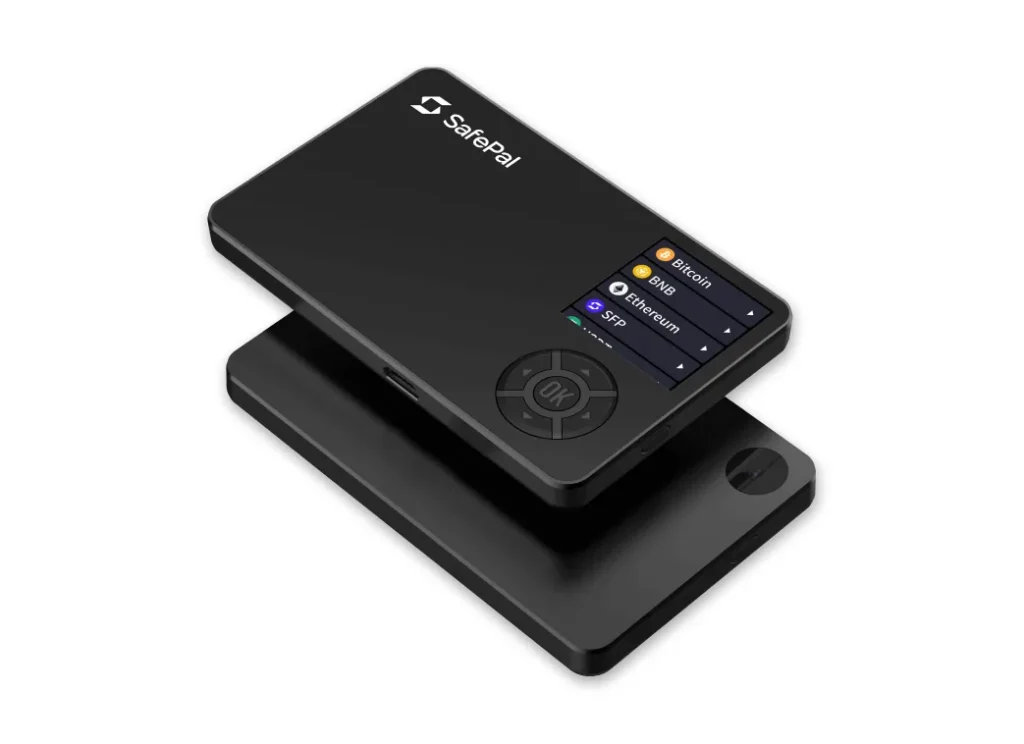
Best For: Long-term holders who want true air-gapped cold storage at the lowest possible cost.
The SafePal S1 is the device that established SafePal as a serious hardware wallet competitor. At roughly $49, it delivers EAL 6+ secure element protection — a certification level typically found in significantly more expensive wallets.
At this price point, you’re paying for the security architecture, not the materials.
Build Quality: Functional, Not Premium
- Weight: 38g
- Screen: 1.3″ IPS (plastic cover)
- Controls: D-pad with physical buttons
The device feels lightweight and plastic-heavy. The buttons are tactile and loud. If you have large hands, entering your seed phrase can feel slow and slightly awkward.
But here’s the important distinction:
Build quality affects experience.
It does not affect key security.
Internally, the chip protection is the same standard used in higher-tier wallets.
Screen & Durability
The glossy plastic screen scratches easily. Over time, micro-abrasions can reduce QR clarity under harsh lighting.
Practical advice:
- Keep the protective film on
- Or install a $5 tempered screen protector
If you plan to use the wallet weekly, this becomes more relevant.
If it stays in a safe most of the year, it’s largely cosmetic.
Battery Behavior (Realistic Expectations)
- Battery: 400mAh
- Rated standby: ~20 days
- Real-world: noticeable self-discharge
If left unused for 2–3 months, the battery will likely be drained.
Important clarification:
This does not impact stored funds.
It only means you’ll need 5–10 minutes of USB-C charging before use.
For long-term storage, this is a minor inconvenience — not a security flaw.
Security Perspective
What matters most:
- EAL 6+ secure element
- Fully air-gapped architecture
- QR-based transaction signing
- Tamper-detection sensors
For under $50, there is currently no other hardware wallet offering this exact security structure.
You are sacrificing:
- Premium materials
- Glass display
- Larger battery
You are not sacrificing:
- Private key isolation
- Secure element certification
- Air-gap design
SafePal uses the industry-standard 12/24-word recovery format defined in the BIP-39 mnemonic seed phrase standard, which ensures compatibility across wallets.
Who Should Choose the SafePal S1?
Buy this if:
- You primarily hold (BTC, ETH, SOL, etc.)
- You sign transactions occasionally
- You want maximum offline isolation on a budget
- You are new to hardware wallets
Upgrade to S1 Pro if:
- You transact weekly
- You care about durability
- You dislike plastic build feel
Snout0x Verdict
The SafePal S1 feels like a budget device — because it is.
But from a security architecture standpoint, it competes far above its price class.
If your goal is cheap, true air-gapped cold storage, this is one of the strongest value plays in 2026.
Best For: The “Set it and Forget it” HODLer.
This is the device that put SafePal on the map. It’s the cheapest way to get EAL 6+ security, but at this price point, you are paying for the chip, not the chassis. On a Budget? Grab the SafePal S1 ($49) for unbeatable value. After testing for several months, this SafePal S1 review concludes that it is the strongest entry-level air-gapped wallet for long-term holders on a budget.
2. SafePal S1 Pro (The “Daily Driver”) – ~$89
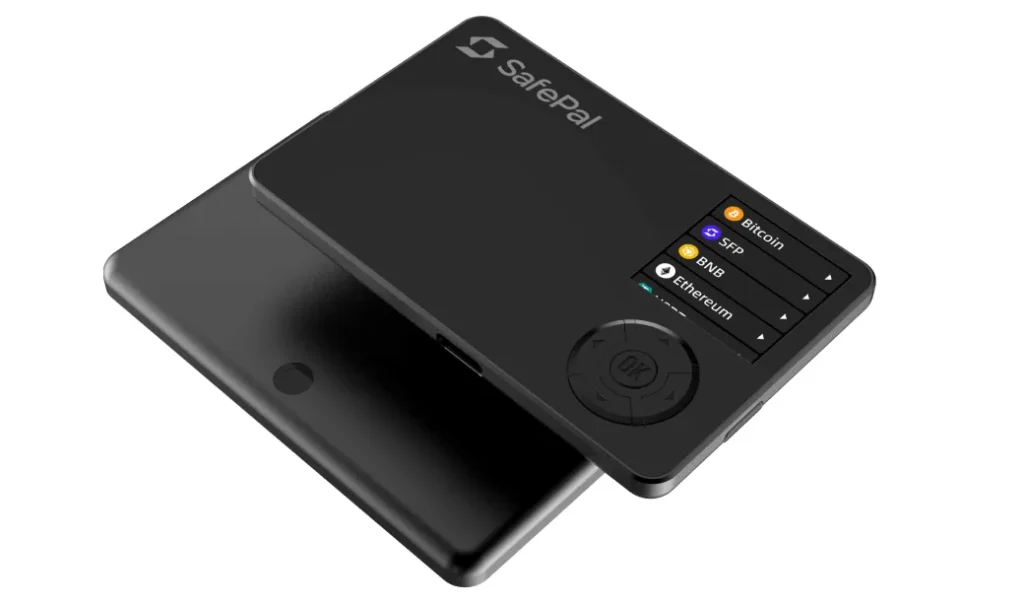
Best For: Active DeFi users, weekly traders, and multi-chain power users.
The SafePal S1 Pro is not just a cosmetic refresh.
It fixes the friction points that become noticeable once you use the original S1 regularly.
If you sign transactions more than once per week, the upgrade makes sense.
What Actually Changes vs. S1?
Security architecture remains the same:
- EAL 6+ secure element
- Fully air-gapped QR signing
- No Bluetooth / No WiFi
The difference is usability, durability, and execution speed.
Glass & Metal Upgrade
- Aluminum alloy chassis
- Tempered glass display
- Heavier, more rigid frame
This isn’t about aesthetics. It’s about durability.
The tempered glass screen eliminates the micro-scratch issue found on the S1. If you scan QR codes frequently, this matters. Over time, plastic screens degrade scanning clarity. Glass does not.
The device also feels more like professional financial hardware instead of a lightweight gadget.
Camera Relocation & Scanning Speed
This is one of the most underrated improvements.
On the original S1:
- The camera placement forces awkward wrist angles.
- Low-light scanning can struggle.
- QR scanning sometimes requires repositioning.
On the S1 Pro:
- The camera is centered.
- Low-light performance is improved.
- Scanning feels near-instant.
If you bridge assets, interact with dApps, or sign multiple transactions per session, this difference becomes noticeable immediately.
Less friction = fewer signing errors.
Battery & Standby Stability
- 500mAh battery
- Improved standby efficiency
- Significantly reduced self-discharge
The original S1 is notorious for draining during storage.
The S1 Pro actually holds its charge between uses.
For traders, this matters. You don’t want to grab your wallet during volatility and discover it’s dead.
Real-World Use Case
Choose the S1 Pro if you:
- Bridge between chains weekly
- Use MetaMask or Rabby regularly
- Farm yield
- Swap tokens often
- Sign more than 5 transactions per month
Stick with S1 if:
- You mostly hold
- You sign transactions occasionally
- You prioritize lowest cost
Cost-Benefit Analysis
Difference in price: ~$40
If you are moving more than $1,000 regularly, the upgrade cost becomes negligible compared to:
- Reduced friction
- Better screen durability
- Faster scanning
- Improved battery reliability
Over a multi-year holding period, the Pro is objectively the better long-term device.
Snout0x Verdict
The SafePal S1 Pro is the version the original S1 should have been.
Same security foundation.
Better execution.
More durable.
Less annoying.
If you are an active participant in DeFi, spend the extra $40.
If you are a pure HODLer, save it. the headache of scratches ruining your scan.
3. SafePal X1 (The “Hybrid Option”) – ~$69
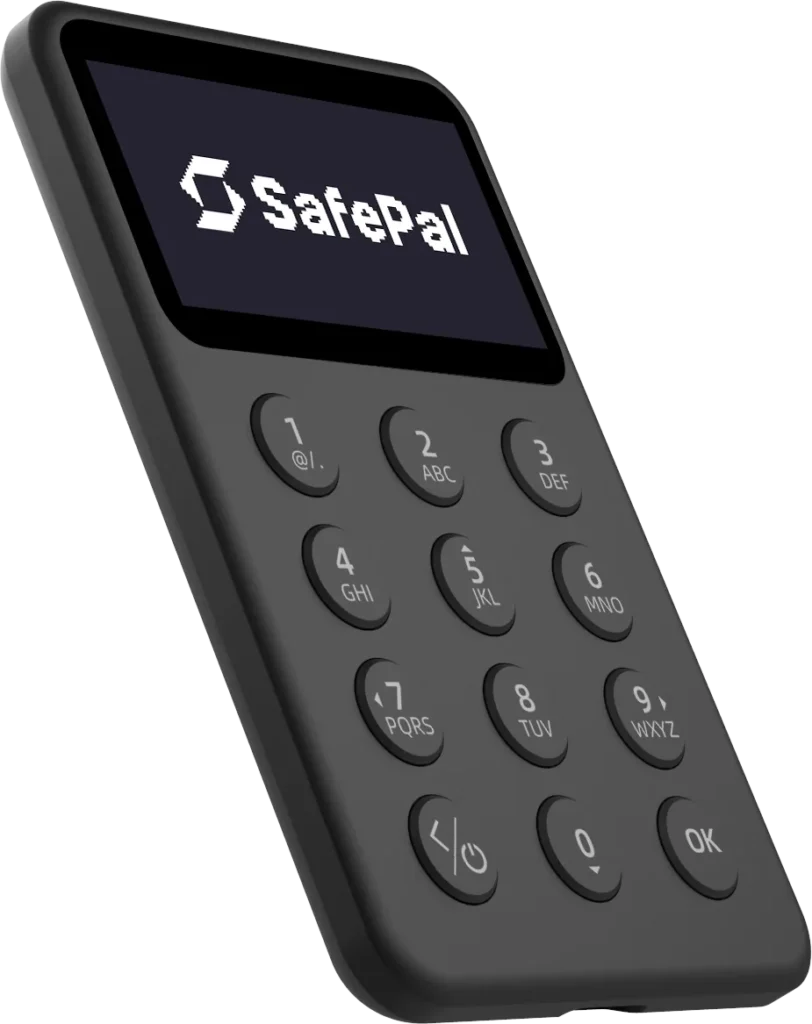
Best For: Users who prefer Bluetooth connectivity and dislike QR-based scanning.
The SafePal X1 represents a different design philosophy from the S1 series.
Instead of prioritizing full air-gap isolation, the X1 introduces Bluetooth 5.0 connectivity for faster and more convenient transaction signing.
This makes it closer in concept to devices like the Ledger Nano X — but with some trade-offs.
Bluetooth Connectivity: Convenience vs. Isolation
The SafePal X1 connects to mobile devices via Bluetooth.
Advantages:
- Faster transaction flow
- No camera scanning required
- More streamlined UX for frequent users
Trade-off:
Adding wireless connectivity increases the theoretical attack surface compared to a fully air-gapped device.
While modern Bluetooth implementations are encrypted and considered secure, the X1 no longer offers the complete isolation that defines the SafePal S1 and S1 Pro.
If maximum offline separation is your priority, the X1 is not the right choice.
Display & Interface
- 1.8” monochrome screen
- 128×64 resolution
- Physical 12-button keypad
The monochrome display improves battery efficiency but feels less modern compared to the color IPS screens on the S1 series.
However, the physical numeric keypad is genuinely useful.
Entering:
- PIN codes
- Recovery phrases
- Passphrases
is significantly faster than navigating with a D-pad.
For users who value input speed over screen clarity, this is a real advantage.
Battery Performance
- 200mAh battery
- Approx. 2 hours of continuous use
The smaller battery keeps the device compact but requires more frequent charging.
For occasional signers, this may not be an issue.
For heavy users, it becomes noticeable.
Who Should Consider the SafePal X1?
Choose the X1 if:
- You prefer Bluetooth over QR scanning
- You value physical keypad input
- You prioritize convenience over strict air-gap isolation
Avoid the X1 if:
- Your primary goal is maximum offline security
- You specifically want an air-gapped wallet
- You already prefer the S1 ecosystem philosophy
Competitive Positioning
At ~$69, the X1 sits in a crowded mid-range hardware wallet category.
If Bluetooth is your priority, other devices in this segment may offer stronger software ecosystems and longer track records.
If SafePal’s air-gapped design is what attracted you originally, the S1 or S1 Pro remain more aligned with that security philosophy.
Snout0x Verdict
The SafePal X1 is not a bad device.
It’s simply different.
It prioritizes convenience over complete isolation.
If your main reason for considering SafePal is air-gap security, stick with the S1 lineup.
If you want Bluetooth convenience within the SafePal ecosystem, the X1 is a functional — though not groundbreaking — alternative.t with better software. If you want SafePal security, stick to the Air-Gapped S1 series.
| Feature | SafePal S1 | SafePal S1 Pro | SafePal X1 |
|---|---|---|---|
| Approx. Price | ~$49 | ~$89 | ~$69 |
| Air-Gapped | Yes (QR only) | Yes (QR only) | No (Bluetooth) |
| Secure Element (EAL) | EAL 6+ | EAL 6+ | EAL 6+ |
| Build / Screen | Plastic body, IPS screen | Aluminum body, tempered glass | Compact body, monochrome screen |
| Signing Method | QR scan | QR scan (faster) | Bluetooth |
| Camera / Scanning | Basic | Centered + better low light | Not needed |
| Battery | 400mAh (can self-discharge) | 500mAh (better standby) | 200mAh (shorter runtime) |
| Best For | Long-term holders | DeFi + frequent signers | Bluetooth convenience |
| Verdict | Best budget cold storage | Best daily-use air-gapped wallet | Convenient, but less isolated |
In this SafePal S1 review, the comparison above makes one thing clear: the S1 delivers the best security-to-price ratio under $50. While the Pro improves usability, the core protection remains the same.
The “Killer App”: Gas Station & Swaps
This is the feature that keeps me using SafePal despite the plastic feel. It solves the biggest pain point in crypto: Stranded Assets.
The Problem: You have $5,000 in USDC on the Ethereum network, but $0.00 in ETH. You are stuck. You can’t move the USDC because you can’t pay the gas fee.
The SafePal Fix (Gas Station): Inside the app, there is a mini-dApp called “Gas Station.”
- You send some dust (USDC, USDT, or SFP) to a designated address.
- SafePal automatically swaps it for the native gas token (ETH, SOL, BNB, MATIC).
- It sends the gas back to your wallet instantly.
The Cost:
- Swap Fee: They charge a standard 0.2% fee on internal swaps.
- Spread: You might lose another ~0.5% on the spread compared to Binance spot prices.
- Is it worth it? When you are stuck and need to sell fast, absolutely. It saves you the 20-minute hassle of logging into Coinbase, buying ETH, and withdrawing it.
The “Killer App”: Why Degens Love SafePal
If you only hold Bitcoin, buy a Trezor. But if you are a “Degen” who hunts meme coins on Solana, bridges to Arbitrum, and stakes on TON, SafePal is the king.
1. The “Gas Station” Feature This is the most underrated feature in crypto. We have all been there: You have $5,000 in USDC on Ethereum, but $0 in ETH. You are stuck. You can’t move the money because you can’t pay the gas fee.
- The SafePal Fix: The “Gas Station” mini-app lets you swap small amounts of USDC (or SFP) for ETH/SOL/BNB gas instantly. No need to go to a centralized exchange.
2. Native Chain Support Ledger requires you to install separate “Apps” for each coin, and the storage fills up fast. SafePal is a vacuum. It supports virtually every EVM chain (Eth, Base, Avax) and non-EVM chains (Solana, Aptos, Sui) out of the box.
Security Analysis: Can It Be Hacked?
SafePal is backed by Binance Labs (which some people love, and some hate), but the security architecture is solid.
1. The Self-Destruct Mechanism The S1 has embedded sensors (light and voltage) inside the casing.
- The Scenario: A thief steals your wallet and tries to use a laser or knife to pry open the case to access the chip.
- The Result: The sensors detect the breach and instantly wipe the memory. The thief is left with a dead piece of plastic. You simply restore your wallet on a new device using your Seed Phrase.
2. EAL 6+ Secure Element This is the industry standard. It means the chip has been tested against high-level penetration attacks (voltage glitching, side-channel attacks) and survived.
3. The Weakness: Closed Source Firmware Unlike Trezor, SafePal’s full firmware code is not open source. You have to trust the company.
- The Counter-Argument: Because the device is Air-Gapped, it is very difficult for “malicious code” to extract your keys because the device cannot talk to the internet.
LINKS
- On a Budget? Grab the SafePal S1 ($49) for unbeatable value.
- Trade Daily? Upgrade to the SafePal S1 Pro ($89)
- Need Bluetooth? Check out the SafePal X1 ($69) (but remember, it’s not air-gapped).
FAQ: The “No-BS” Questions
1. Is SafePal safer than Ledger?
From a hardware perspective, yes, because it has no Bluetooth (Air-Gap). It reduces the attack surface significantly. However, Ledger has a longer track record and open-source SDKs.
2. What happens if SafePal goes out of business?
Nothing happens to your money. SafePal uses the BIP39 standard (the 12/24 words). You can take your seed phrase and type it into any other wallet (like Ledger, Trezor, or Trust Wallet) and your funds will be there.
3. Can I use SafePal with MetaMask?
Yes. You can connect the SafePal hardware wallet to MetaMask or Rabby as a “Hardware Device.” You initiate the trade on your PC, and you sign it by scanning the QR code on the S1 screen.
4. Does the battery die quickly?
On the S1? Yes. It’s a small battery. If you leave it in a drawer for 6 months, it will likely be dead. You’ll need to charge it via USB-C for 10 minutes before using it. The S1 Pro has a much better battery.
5. Which coins does SafePal support?
Virtually everything. It supports 100+ blockchains including Bitcoin, Ethereum, Solana, TON, Cardano, Ripple, and all EVM Layer 2s (Arbitrum, Optimism, Base).

