Last Updated on April 16, 2026 by Snout0x
A crypto wallet is not where your coins live. It is the tool that holds your private keys, derives your public keys and addresses, and lets you sign transactions that move assets on a blockchain. When people say “my wallet,” they often mean an app or device, but at the protocol level the wallet’s real job is to protect secret keys and use them safely.
This guide explains what a crypto wallet is, how it relates to private keys and addresses, the difference between hot and cold wallets, and how to choose a safe setup for everyday spending versus long-term storage.
This content is for educational purposes only and should not be considered financial or investment advice.
Simple Definition
A crypto wallet is a key manager. It holds your private keys, derives your addresses from them, and signs every transaction you make. Your coins never live inside the wallet — they stay on the blockchain. The wallet just holds the proof that you can move them.
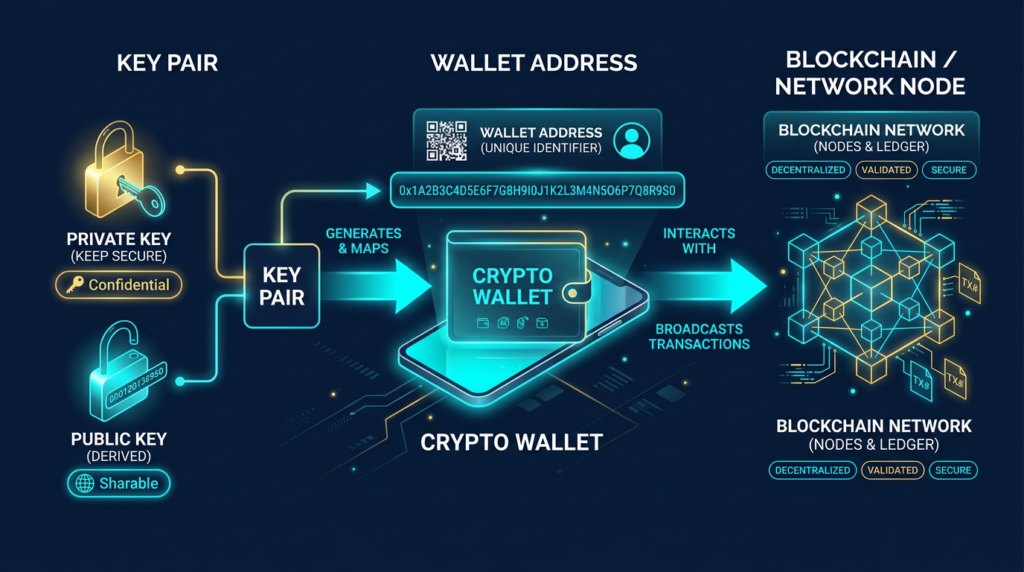
At its core, a crypto wallet is a key manager. It generates and stores private keys, derives public keys and wallet addresses from them, and uses those keys to sign transactions. The coins themselves always stay on the blockchain. What changes ownership is which keys are authorized to spend them.
You can think of a wallet like a password manager for blockchains. Instead of dozens of website passwords, you have one recovery phrase that can recreate many keys and addresses. The wallet’s interface shows balances, QR codes, and history, but its critical function is to keep the signing keys under your control.
Another simple mental model is that the wallet is not the vault where coins sit. It is the key ring that proves which coins you are allowed to move. People often imagine assets as being “inside” the app or device, but the blockchain is where balances live. The wallet’s job is to manage the credentials that authorize changes to those balances.
Why It Matters
Wallet design is not just a UX decision. It changes your risk model. If keys are exposed to weak devices, bad approvals, or custodial dependencies, funds can be lost even when the blockchain itself is working correctly.
A more useful way to frame wallet choice is: which failure are you trying to avoid? Some setups mainly expose you to platform and access risk. Others reduce platform dependency but increase the cost of seed backup mistakes, phishing errors, and poor device hygiene.
How It Works
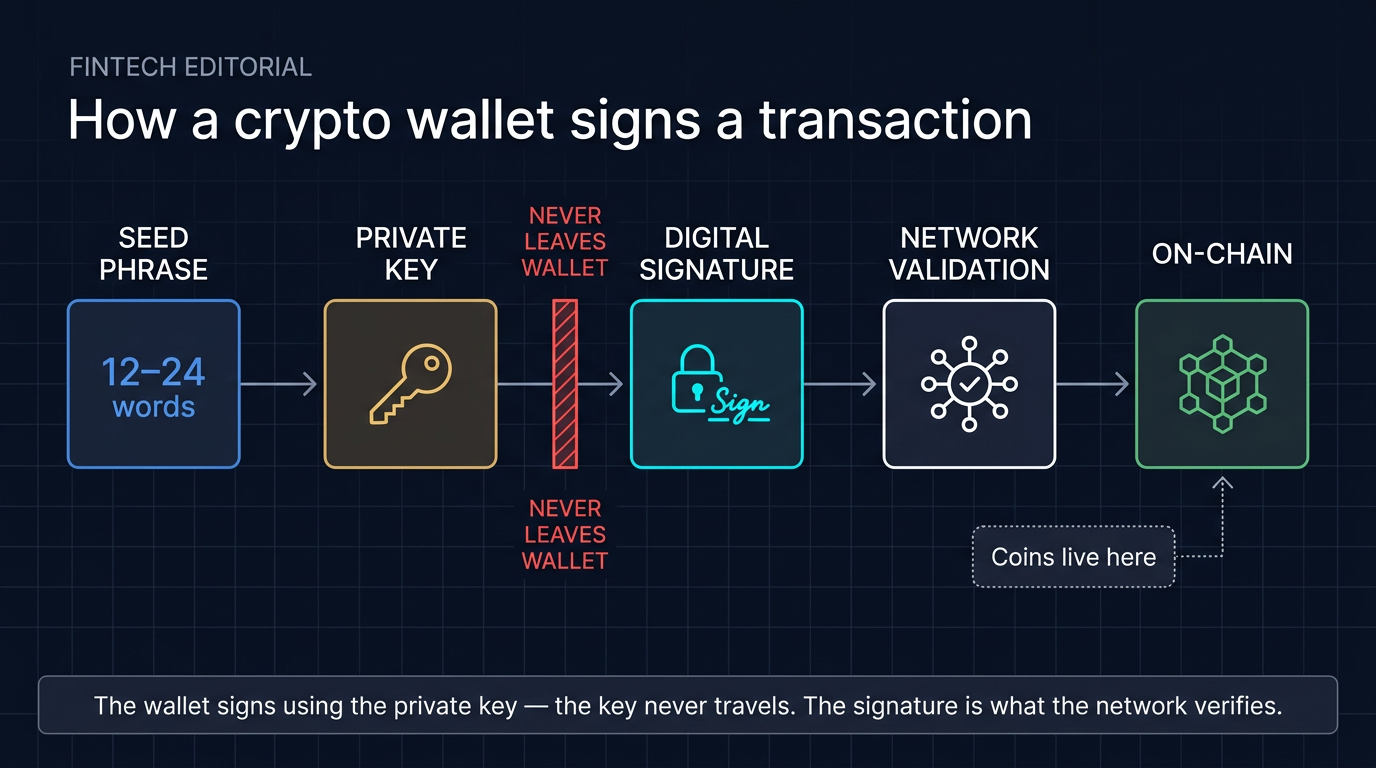
Every non-custodial wallet is built on a simple hierarchy:
- Seed phrase: A 12–24 word phrase that encodes the root private key for your wallet.
- Private keys: Long random numbers derived from that root. Each private key controls one or more addresses.
- Public keys: Generated from private keys using one-way math. Safe to share; used to verify signatures.
- Addresses: Shorter, human-usable identifiers derived from public keys. This is what you give people to receive crypto.
When you send a transaction, your wallet:
- Builds a transaction describing which coins or tokens should move.
- Uses the relevant private key to create a digital signature.
- Broadcasts the signed transaction to the network.
Full nodes and validators then check that the signature matches the public key and address that currently hold the funds. If the math checks out and the transaction follows the consensus rules, it is added to the chain. At no point does anyone else need to see or hold your private key if you are using the wallet correctly.
Hot Wallets vs. Cold Wallets
Wallets are often grouped into two broad categories based on how the keys are stored:
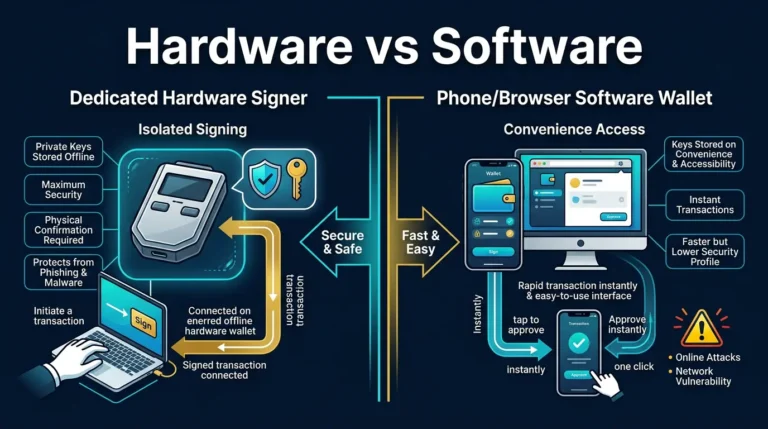
- Hot wallets keep private keys on an internet-connected device like your phone, laptop, or browser.
- Cold wallets keep private keys offline, usually on a dedicated hardware device or even on paper or metal backups.
Hot wallets are convenient. They are ideal for small balances, frequent trading, or interacting with Web3 dapps. The trade-off is that malware, browser extensions, and phishing sites have more opportunity to interact with the environment where keys or signing approvals live.
Cold wallets emphasize security over speed. A well-designed hardware wallet keeps private keys in a secure element or isolated chip and only signs transactions after you confirm details on a trusted screen. Even if your computer is compromised, the attacker cannot directly read the keys from the hardware device.
A useful intuitive point is that hot and cold do not describe whether a wallet feels modern or old-fashioned. They describe how exposed the signing environment is. A phone wallet can be excellent for convenience, while a hardware wallet is better for isolation. The right choice depends on whether you are optimizing for frequent use or minimizing attack paths.
Custodial vs. Non-Custodial Wallets
There is another important split: who actually controls the keys.
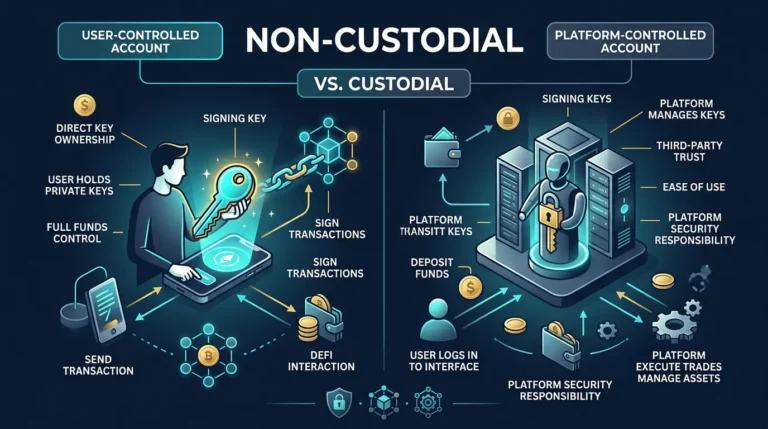
- Custodial wallet: An exchange or service holds the private keys for you. You log in with a username and password, but the company can move funds on-chain.
- Non-custodial wallet: You hold the seed phrase and private keys. Losing the keys means losing access, but no third party can freeze or reassign your funds.
Custodial wallets are convenient for beginners and short-term trading, but they carry platform risk. If the exchange is hacked, becomes insolvent, or decides to freeze withdrawals, your assets are at risk. Historically, many of the largest crypto losses have come from custodial failures rather than on-chain exploits.
Non-custodial wallets align with the core idea of controlling your own keys. You gain more control and censorship resistance, but you also take full responsibility for backups, device security, and avoiding scams.
Types of Crypto Wallets You Will See
- Mobile wallets: Apps like BlueWallet or Phoenix that run on your phone and hold keys locally.
- Browser extension wallets: Tools like MetaMask that live in your browser and connect directly to dapps.
- Desktop wallets: Full-node or light wallets installed on a laptop or PC.
- Hardware wallets: Dedicated signing devices such as Ledger, Trezor, or Keystone that keep keys in a separate chip.
- Multi-signature setups: Wallets that require multiple keys to approve a transaction, often spread across devices or people.
Most modern wallets are HD (hierarchical deterministic), meaning one seed phrase can deterministically derive many addresses across multiple blockchains. This makes backups simpler: you protect the seed phrase once instead of backing up every individual key.
Common Mistakes
Because wallets sit at the edge between humans and cryptography, many real-world losses come from user mistakes rather than protocol bugs. The most common include:
For a closely related follow-up, see Hardware Wallet Setup: How to Do It Safely from the Start.
- Storing seed phrases in the cloud. Screenshots in iCloud or Google Drive are a frequent source of compromise.
- Entering a seed phrase into a website. Legitimate services never need your full seed phrase; this is almost always crypto phishing.
- Using one device for everything. Browsing, gaming, and high-value wallets on the same infected laptop is asking for trouble.
- Skipping backups. If a hardware wallet is lost or destroyed and you never wrote down the seed phrase, funds are gone.
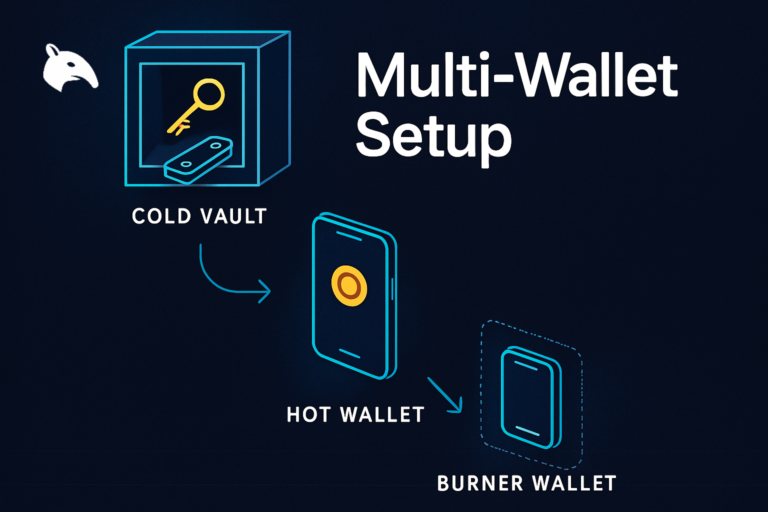
Good wallet hygiene means separating roles. Use a small, convenient hot wallet for daily spending or experimentation, and keep serious savings in harder-to-reach setups such as hardware wallets or multi-signature vaults. If you want the practical storage framework behind that separation, see how to store crypto safely.
Security and Risk Considerations
The “right” wallet depends on three main factors: the amount at risk, how often you transact, and your tolerance for complexity.
- Small experimental balances: A reputable mobile or browser wallet is usually enough.
- Core long-term holdings: A hardware wallet or multi-signature wallet with proper backups.
- Active DeFi user: A combination of hardware wallet plus a browser extension that uses the hardware for signing.
A practical workflow is to assign a role before you choose a product. Ask whether this wallet is for access, experimentation, or savings. Then size the balance to that role. A browser wallet used for testing dApps should hold an amount you can afford to expose to signing risk. A long-term savings wallet should be slower, more isolated, and backed by a recovery process you have actually rehearsed.
Before moving large amounts, test your setup with small transfers. Confirm you can:
- Receive to the correct address.
- Send from the wallet after confirming on the device screen.
- Recover access using only the seed phrase on a second device.
If you cannot confidently complete those steps, adjust the setup until you can. The practical lesson is that a wallet is only as safe as the process around it. A technically strong device used with an untested backup is weaker than a simpler wallet with a documented recovery routine. For category decisions beyond the definition level, see How to Choose a Crypto Wallet.
Sources
Frequently Asked Questions
Is a crypto wallet an app or a device?
“Wallet” is an umbrella term. It can refer to a mobile app, a browser extension, a desktop program, or a dedicated hardware device. What makes something a wallet is that it manages keys and signs transactions, not the exact form factor.
Can I have multiple wallets for the same coins?
Yes. You can generate as many wallets as you like, each with its own seed phrase and keys. Many users keep separate wallets for long-term holdings, trading, and experimental DeFi activity to reduce blast radius if one is compromised.
What happens if I lose my phone or hardware wallet?
If you have a proper seed phrase backup stored offline, you can restore the wallet on a new device and regain access. If you never wrote the seed phrase down and the only copy was on the lost device, the funds are effectively unrecoverable.
Should I keep all my crypto in one wallet?
Keeping everything in a single wallet concentrates risk. A more resilient approach is to use multiple wallets and security tiers: a hot wallet for small amounts and one or more cold or multi-signature wallets for serious holdings.
Is a wallet the same as an exchange account?
No. An exchange account is a custodial interface into the exchange’s own wallets. You typically do not control the underlying private keys. A true non-custodial wallet gives you direct control over keys and on-chain transactions.