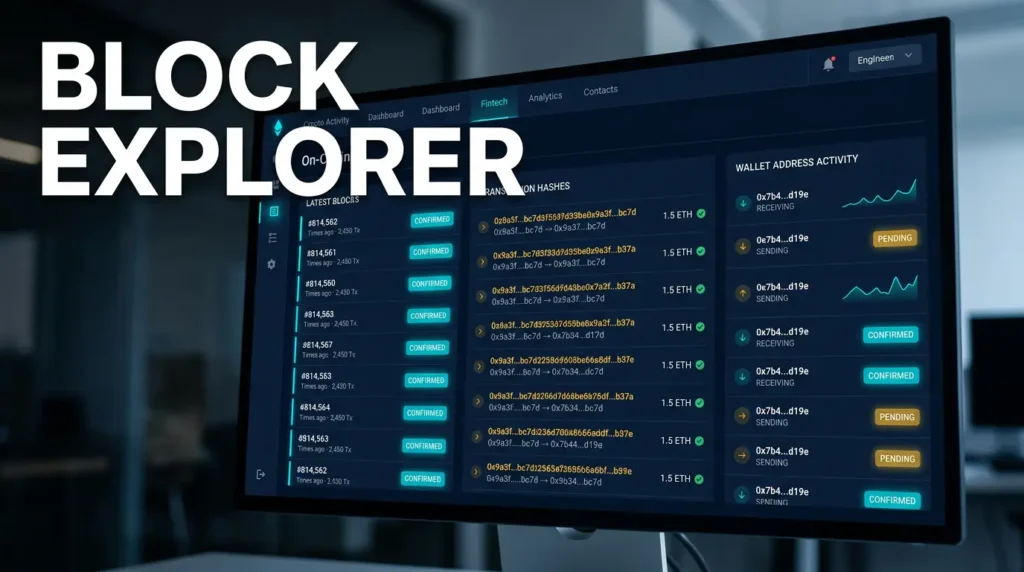
A block explorer is a web interface that lets users inspect public on-chain data such as blocks, transactions, wallet activity, token transfers, and smart contract interactions. It does not create that data and it does not control the network. It reads data that already exists on the blockchain and presents it in a searchable format that humans can understand more easily.
The easiest way to think about an explorer is as a read-only search layer over blockchain history. Instead of running raw database queries against a full node, users type in a transaction hash, block height, wallet address, or token contract and get a structured view of what happened on-chain. That makes explorers one of the most useful tools in crypto for verification, troubleshooting, and basic scam analysis.
This content is for educational purposes only and should not be considered financial or investment advice.
Key Takeaways
- An explorer is a viewing tool, not the blockchain itself: It indexes public chain data and makes it searchable.
- Users rely on explorers to check transaction status and address activity: They are the fastest way to verify whether a transfer was sent, confirmed, or failed.
- Different chains have different explorers and field formats: Bitcoin, Ethereum, and other networks expose different data structures and terminology.
- Explorer output is useful but still needs interpretation: Raw on-chain data can be misunderstood if users do not know what each field means.
- Explorers are essential for audits, support, and scam checks: They help users trace asset movement without relying only on wallet screenshots or platform claims.
What an Explorer Actually Does
A public chain stores transaction history as structured data distributed across many nodes. That raw data is not especially friendly for normal users to browse directly. An explorer solves that by indexing blocks, transactions, addresses, token events, and contract activity into a format that can be searched and displayed through a website or API.
One practical mental model is to treat the blockchain as the ledger and the explorer as the searchable front end built on top of it. The ledger is the source of truth. The explorer is the interface that helps you read that truth faster. If you want the network side of that ledger, the most relevant local follow-up is What Is a Bitcoin Node?.
What You Can Look Up
- Transaction hashes: Check whether a transaction was broadcast, confirmed, replaced, failed, or still pending.
- Wallet addresses: See inbound and outbound history, balances, and sometimes token holdings.
- Blocks: View block height, timestamp, validator or miner information, and included transactions.
- Tokens and smart contracts: Inspect token transfers, contract calls, holder counts, and emitted events on smart-contract chains.
- Fee and timing data: Review gas paid, sat/vB, confirmation timing, or congestion context depending on the network.
This is why explorers are so common in support workflows. If a wallet says a transfer is pending, an explorer can usually show whether the transaction actually reached the network, how many confirmations it has, and whether a fee issue or network backlog is slowing it down.
How an Explorer Gets Its Data
An explorer typically connects to one or more nodes, pulls block and transaction data, normalizes it, and stores indexed records in a separate database optimized for search. That indexing step is what makes quick lookups possible. Without it, every query would be slower and much harder to present cleanly to end users.
A useful mental model here is a library catalog. The blockchain is the full collection of books. The explorer is the card catalog and search system that helps you find the right page quickly. It does not change the book. It changes how easy it is to find and read what is already there.
One operator insight is that explorers are not all equally complete or equally fast. Some index more token standards, decode more contract events, or update faster during heavy activity. That means two explorer views can differ slightly in presentation even when they are reading the same underlying chain.
How This Looks on Different Networks
Bitcoin explorers usually emphasize transaction inputs and outputs, confirmation counts, addresses, and fee rates. Ethereum-style explorers emphasize account balances, nonce, gas usage, token transfers, internal transactions, and smart contract calls. The core idea is the same, but the data model changes because the chains themselves are built differently.
For that structural difference, the closest local explanation is Bitcoin vs Ethereum Transaction Model. Understanding the UTXO model versus the account model makes explorer screens much easier to interpret.
Why Explorers Matter for Everyday Users
Explorers reduce guesswork. Instead of trusting a wallet spinner, exchange support reply, or screenshot from another person, you can look at the transaction directly. That makes explorers useful for checking deposits, withdrawals, stuck transactions, contract approvals, token receipts, and suspicious fund flows.
- Checking transaction status: Has it been confirmed or is it still pending?
- Checking address history: Has this wallet interacted with suspicious contracts or received unexpected transfers?
- Checking fees: Did the sender use too little fee, or did the network simply get congested?
- Checking token movement: Did the token actually move, or did the wallet UI just refresh incorrectly?
For Bitcoin-specific queue behavior behind pending transactions, see Bitcoin Mempool Explained: How the Transaction Queue Works and Bitcoin Transaction Fees Explained. Those ideas often answer why an explorer shows “unconfirmed” longer than users expect.
What an Explorer Does Not Tell You Automatically
An explorer shows data, but it does not automatically explain intent. Seeing a wallet receive funds does not tell you who controls it. Seeing tokens arrive does not prove they are legitimate. Seeing a transaction succeed does not mean the overall trade or protocol interaction was safe. Users still have to interpret what the data means in context.
A second operator insight is that explorers can make bad projects look more legitimate than they are because the interface looks technical and authoritative. A token existing on-chain does not make it trustworthy. A smart contract with many transactions does not make it safe. Explorer data helps investigation, but it does not replace judgment.
Practical Usage: How to Read an Explorer Without Getting Lost
The best way to use an explorer is to start with one identifier and follow the trail carefully. Use a transaction hash when checking a specific payment. Use a wallet address when reviewing a history of transfers. Use a token contract address when verifying that you are looking at the correct asset rather than a copycat token.
For a closely related follow-up, see Wallet Address Reuse Risks: What It Exposes On-Chain.
- Start with the status field: Check whether the transaction is pending, confirmed, failed, or replaced.
- Check timestamps and block inclusion: This shows when the network actually processed the event.
- Check sender and recipient carefully: Similar-looking addresses can still be different.
- Check value and fee separately: The payment amount and the cost of processing it are not the same thing.
- Check token contract details before trusting a token page: Scammers often exploit name similarity.
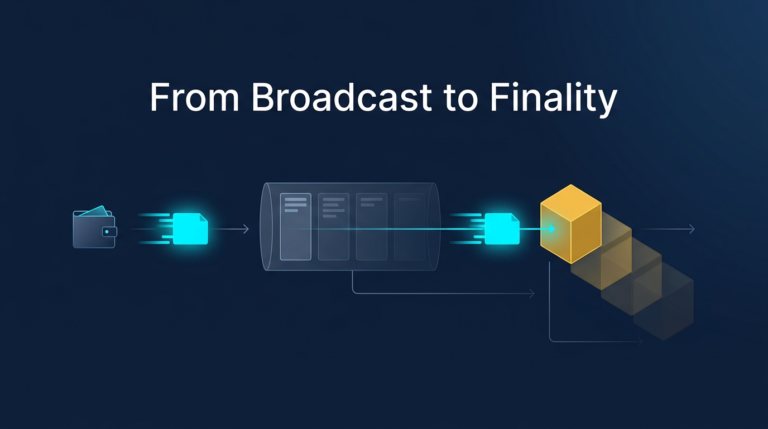
For the signing step behind what later appears on an explorer, the closest local companion piece is What Is Transaction Signing in Crypto. A transaction does not appear in explorer results by magic. It appears because a wallet created and broadcast signed data to the network.
Risks and Common Mistakes
- Confusing explorer data with guaranteed truth about identity: The chain can show an address and its activity, but it usually cannot tell you who owns that address in the real world.
- Trusting token names instead of contract addresses: Copycat tokens can look real on the surface while pointing to a different contract.
- Panicking over pending transactions too quickly: A delay may reflect congestion or low fees rather than loss of funds.
- Assuming success means safety: A successful contract interaction can still be a bad trade, bad approval, or malicious transfer from the user’s perspective.
- Relying on one explorer view alone: If something looks unusual, checking a second explorer or a wallet’s own node-backed data can help confirm the picture.
Sources
- Bitcoin Developer Guide: Block Chain
- Ethereum.org: JSON-RPC API Overview
- Bitcoin Developer Reference: Transactions
Frequently Asked Questions
What does a block explorer show?
It shows searchable on-chain data such as transactions, wallet activity, blocks, balances, token transfers, and contract interactions, depending on the network.
Can I track my crypto transaction with an explorer?
Yes. If you have the transaction hash or the wallet address involved, you can usually see whether the transfer is pending, confirmed, failed, or still waiting on network conditions.
Does an explorer tell me who owns a wallet?
Usually no. It shows the wallet’s public activity, not the real-world identity of the person or entity controlling it, unless that address has already been publicly attributed elsewhere.
Why would a transaction show as pending?
It may still be waiting in the network because of low fees, congestion, or chain-specific confirmation timing. Pending does not automatically mean failed or lost.
Can an explorer detect scams by itself?
No. It can reveal suspicious transaction patterns or contract history, but users still need judgment and context to decide whether an address, token, or protocol is dangerous.