Last Updated on April 14, 2026 by Snout0x
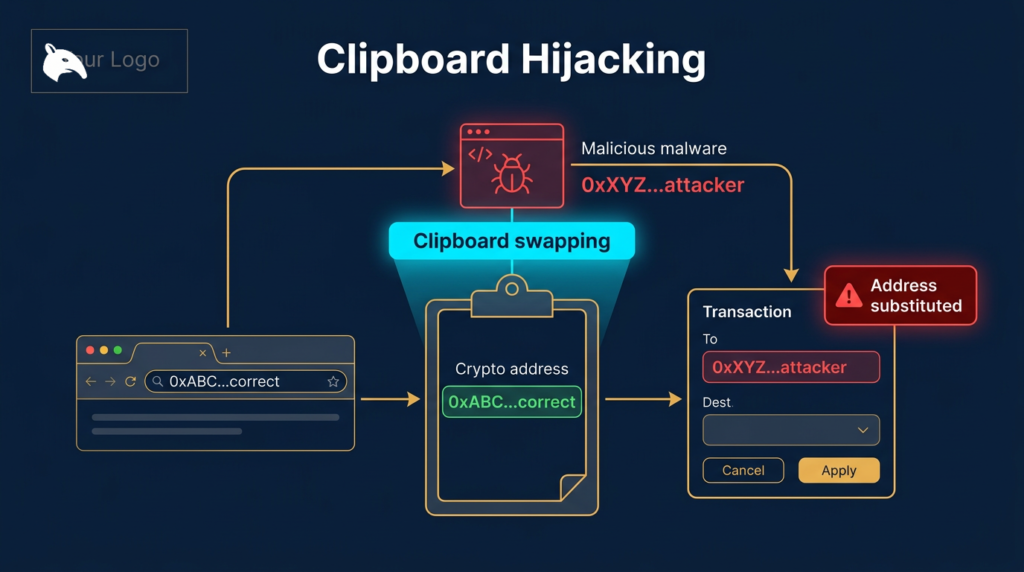
Clipboard hijacking is one of the most technically simple and practically effective attacks targeting crypto users. The malware does not need your private key. It does not need your recovery phrase. It does not need to break into any wallet or exchange. It only needs to monitor your clipboard and replace a cryptocurrency address you have copied with its own address at the moment you paste it. If you do not verify the pasted address matches what you copied, your funds go directly to the attacker with no recovery possible.
The practical defense is simple but non-optional: treat every pasted destination address as untrusted until you verify it against the source or on a trusted device screen. Clipboard hijacking succeeds because users assume copy-paste removed the need to read carefully. In this attack, copy-paste is exactly where the substitution happens.
This content is for educational purposes only and should not be considered financial or investment advice.
Key Takeaways
- Clipboard hijacking malware silently monitors the clipboard for crypto addresses and substitutes them with the attacker’s address.
- The substitution happens in the clipboard, not on screen: the source site still shows the correct address after the swap.
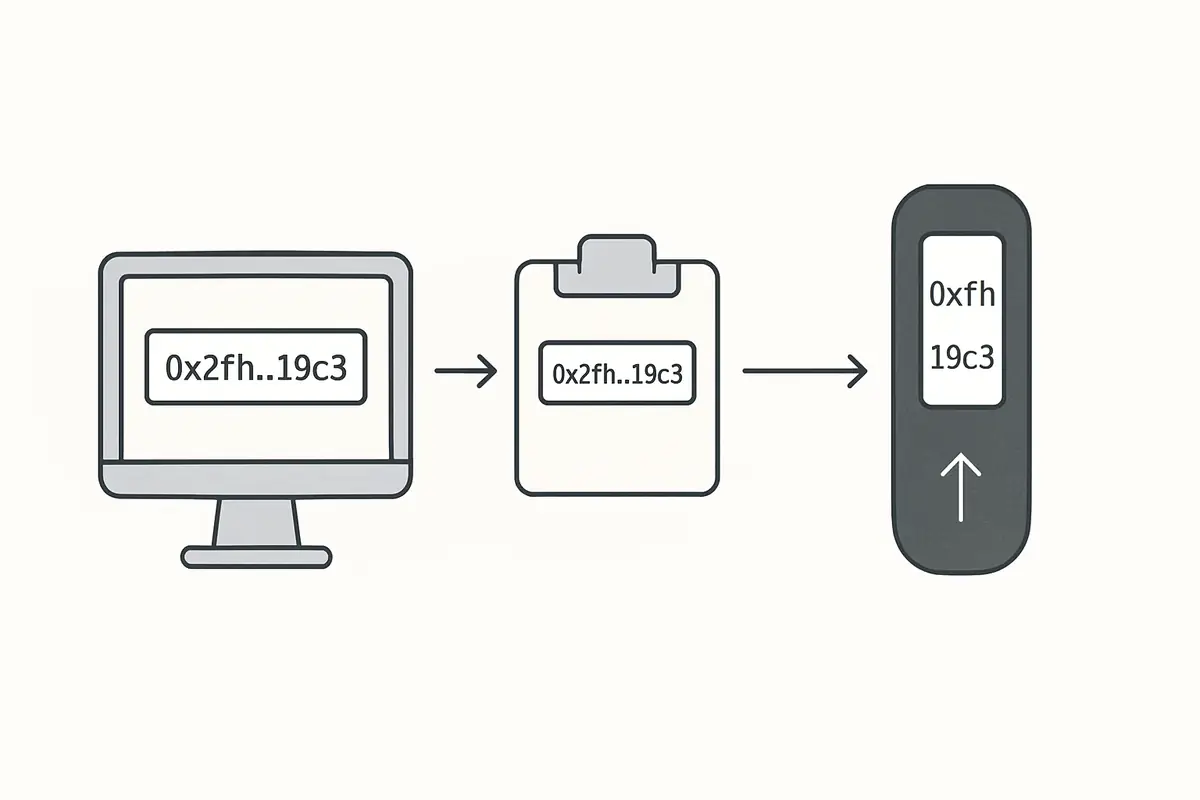
- Verification on a hardware wallet screen is the most reliable defense: the device shows the address it received, not the address your computer displayed.
- Manually verifying first and last 8 characters of pasted addresses catches substitution attacks.
- Legitimate clipboard hijacking malware is bundled in trojanized software, pirated apps, and fake browser extensions.
How Clipboard Hijacking Works
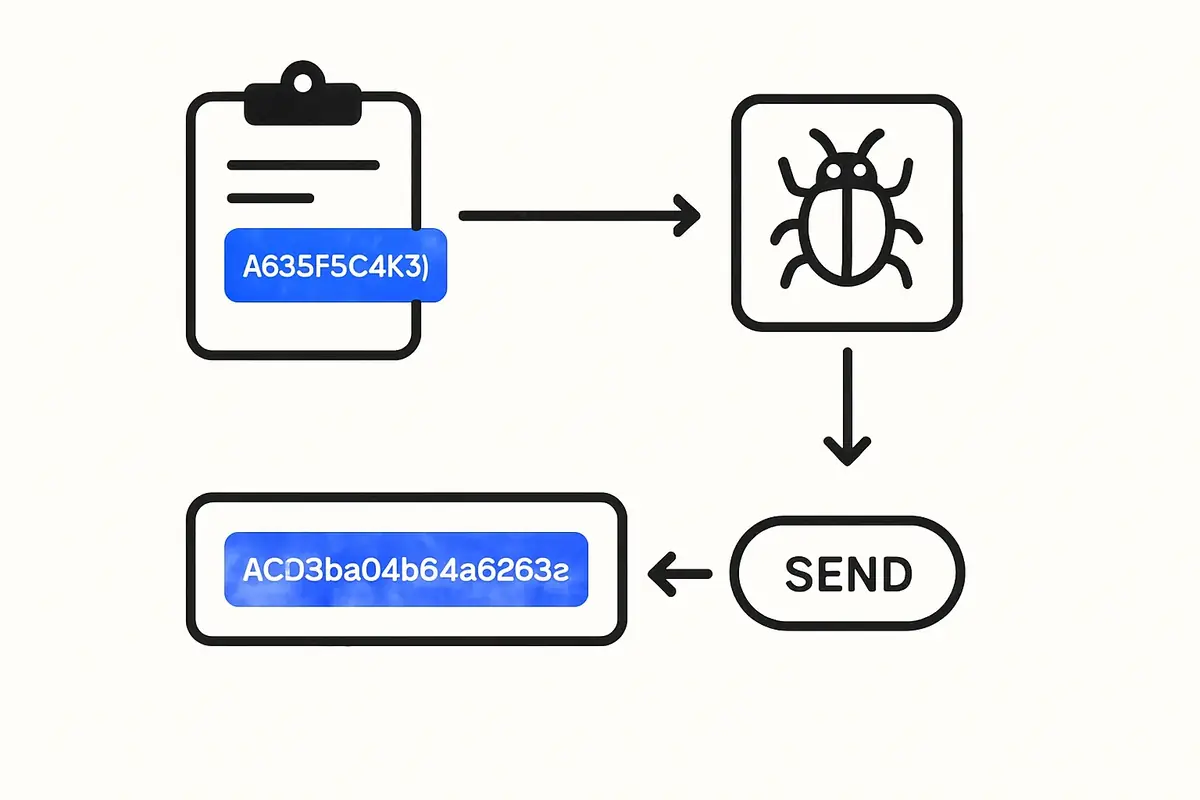
The attack is mechanically simple. Once the malware is installed on your device, it runs a background process that continuously monitors the system clipboard. When the malware detects that a string matching the pattern of a cryptocurrency address (Bitcoin, Ethereum, Solana, etc.) has been placed in the clipboard, it immediately overwrites it with the attacker’s address of the same type.
From the victim’s perspective, nothing visible changes. The original website still shows the correct address. The transaction form still shows the original address in the “To” field for the fraction of a second before paste. After pasting, the attacker’s address is in the field, but it is visually similar (same format, same length). Many users paste and immediately proceed without re-reading the field, completing a transaction to the attacker’s wallet.
Attackers generate or find addresses that share the first 4 to 6 characters with commonly used addresses to reduce the chance of detection on a quick visual scan. More sophisticated variants also match the last few characters, making a brief visual check insufficient.
How Clipboard Hijacking Malware Gets Installed
Clipboard hijackers do not self-install. They are delivered through trojanized software packages. Common delivery vectors include:
- Pirated software. Cracked versions of paid software (video editors, VPN clients, development tools) distributed through torrent sites often include bundled malware.
- Fake browser extensions. Crypto-related browser extensions that are fake or compromised versions of legitimate tools. Extensions request clipboard access as part of their stated functionality, making the permission request unremarkable.
- Trojanized development packages. Malicious packages published to npm or PyPI under typosquatted names targeting developers. A developer who installs a malicious package has clipboard hijacking running in their development environment.
- Discord and Telegram malware delivery. Fake bots or files shared in crypto communities that, when executed, install clipboard monitoring alongside a legitimate-seeming application.
The malware is lightweight and designed to be invisible. It does not cause noticeable performance degradation. Users who do not specifically check for it often remain infected for weeks or months.
How Much Has Been Stolen This Way?
Clipboard hijacking is among the most consistently deployed malware categories targeting crypto users. Individual incidents range from a few hundred dollars to hundreds of thousands, depending on the amount the victim was transferring when the substitution occurred. The attack scales naturally: the malware runs silently on potentially thousands of infected machines simultaneously, waiting for any clipboard event involving cryptocurrency.
Blockchain analytics firm Chainalysis has documented clipboard hijacking as one of the most active categories of crypto malware year-over-year. Unlike targeted hacks, it is a volume play: low technical complexity, wide deployment, and near-zero infrastructure cost for the attacker.
How to Detect Clipboard Hijacking
The simplest detection method is to copy a cryptocurrency address, then paste it into a plain text editor and compare it against the source. If the pasted address is different from the source, you have active clipboard hijacking malware on your device.
Some security software detects clipboard hijackers specifically. Malwarebytes and similar endpoint security tools have signatures for common clipboard hijacker variants. Running a scan when you suspect infection is a reasonable first response.
The nuclear option is a fresh OS installation, which eliminates any persistent malware. For users who cannot identify and remove an infection, this is the only reliable remediation.
Practical Usage: Verify Before You Send
For the broader wallet-attack context, see What Is Crypto Phishing?. Clipboard hijacking is a different mechanism, but it exploits the same user habit of trusting the screen too quickly.
For a concrete hardware example, see Best Seed Phrase Backup Devices: What to Use and Why.
For a closely related follow-up, see Exchange Withdrawals Will Pause Again.
A strong operator workflow is to verify the destination twice: once immediately after paste in the sending app, and once again on the trusted confirmation surface if you have one. On larger transfers, send a small test transaction first instead of assuming the copied address stayed intact end to end.
A common real-world version looks like this: you copy a withdrawal address from your wallet app, paste it into an exchange withdrawal form, glance only at the first few characters, and confirm because you are in a hurry. The exchange sends exactly where the pasted string pointed. By the time you notice the mismatch, the transaction is already final.
- Verify the pasted address before sending. After pasting, compare at minimum the first 8 and last 8 characters of the pasted address against the original. Better: compare the full address character by character for large transactions.
- Verify on your hardware wallet screen. When using a hardware wallet, the device screen shows what it received. Malware that substituted the address in your browser cannot change what the hardware wallet displays. If the address on the device screen does not match your intent, reject the transaction. This is covered in detail in Hardware Wallet Screen Security.
- Avoid pirated software on devices used for crypto. The risk/reward of pirated software is one-sided for crypto users: the savings on a software license are trivially small compared to the potential for clipboard hijacking.
- Review browser extension permissions. Audit installed extensions and remove any that are unnecessary or from unknown publishers. Clipboard access should be scrutinized.
- Use a dedicated device for crypto transactions. A clean, minimal-software device used only for crypto activities significantly reduces the attack surface compared to a general-purpose computer with dozens of installed applications.
An operator habit worth adopting is to distrust urgency around address entry. If a transfer feels time-sensitive, that is exactly when clipboard mistakes become more likely. Another useful rule is to re-copy the destination from a second trusted source if anything about the pasted address looks unfamiliar, even if only one block of characters appears off.
What to Do If You Sent Funds to the Wrong Address
On most blockchains, there is no recovery mechanism. Transactions are irreversible. If you discover after the fact that your funds went to an attacker’s address due to clipboard hijacking, the funds are lost. No exchange, no developer, and no law enforcement can reverse a confirmed on-chain transaction.
The best you can do: report the address to major exchanges so they can flag or freeze any accounts that receive it (which may prevent the attacker from cashing out). File a report with the FBI’s IC3. Neither is likely to result in fund recovery, but the reports contribute to aggregate data used in blockchain investigations.
Risks and Common Mistakes
The single most dangerous habit is pasting cryptocurrency addresses without verifying them. This is especially risky for larger transactions where the habit of quick paste-and-send is more costly. For significant transfers, add a manual verification step to the workflow regardless of the urgency of the transaction. Urgency is sometimes itself a manipulation tactic designed to prevent careful verification.
Another mistake is trusting the transaction confirmation screen as the definitive verification. The confirmation screen on your computer is rendered by the same process that may be compromised. Only the hardware wallet screen provides verification that bypasses the host computer’s state.
Frequently Asked Questions
Can clipboard hijacking affect mobile devices?
Yes. Mobile clipboard hijacking has been documented on Android devices, typically delivered through malicious apps outside the official app stores. iOS has stricter app sandboxing that makes clipboard monitoring harder but not impossible; recent iOS versions limit background clipboard access significantly. The risk is lower on iOS than Android but not zero if you install apps from outside the App Store.
Will antivirus software catch clipboard hijackers?
Modern antivirus and endpoint protection tools with updated signatures can detect known clipboard hijacker variants. However, new variants and freshly packaged malware may evade detection for weeks until signatures are updated. Antivirus is a useful layer but not a substitute for manual address verification.
Is QR code scanning safer than copy-paste?
Yes, in most cases. A QR code displayed on a legitimate device cannot be silently replaced by clipboard malware (because you are not using the clipboard). However, a compromised application could display a fraudulent QR code, so you still need to verify the address shown in the QR against your intended destination. QR codes reduce clipboard substitution risk but do not eliminate verification requirements.
How common is this attack?
Clipboard hijacking is consistently among the most deployed categories of crypto malware. It is attractive to attackers because it is low-complexity, hard for victims to detect in real time, and monetizes directly through diverted transactions rather than requiring additional steps to extract value.