Last Updated on April 19, 2026 by Snout0x
A fake wallet app is a malicious app or download page that pretends to be a legitimate crypto wallet but is designed to steal recovery phrases, passwords, or transaction approvals. The scam often looks professional enough that users think they are installing a real wallet from a normal source. By the time they enter their recovery words or start using the app, the attacker has everything needed to empty the wallet.
These scams are especially dangerous for beginners because the setup flow feels familiar. Install the app, open it, import a wallet, and continue as normal. That routine is exactly what the attacker wants. The theft does not require breaking encryption. It only requires getting the victim to trust the wrong software at the very start.
This content is for educational purposes only and should not be considered financial or investment advice.
Install only from the official project site — never from search ads, sponsored links, or screenshots.
Verify the publisher and exact domain, not the icon — branding is the easiest thing for an attacker to copy.
Never restore a seed phrase into an unverified app — that single action ends the security discussion.
Key Takeaways
- Fake wallet apps target setup trust: The scam works by replacing the real wallet software before the user ever notices a problem.
- The main prize is the recovery phrase: Once a victim imports or restores a wallet into a malicious app, the attacker can recreate the wallet elsewhere and drain funds.
- App stores are not perfect filters: Copycat apps, typosquatted names, and cloned download pages can still slip in front of users.
- Branding is easy to fake: Logos, screenshots, and polished onboarding screens are weak proof that a wallet is legitimate.
- The best defense is install discipline: Download only from verified sources, compare publisher details, and never rush recovery setup on an unfamiliar app.
How Fake Wallet Apps Actually Steal Funds
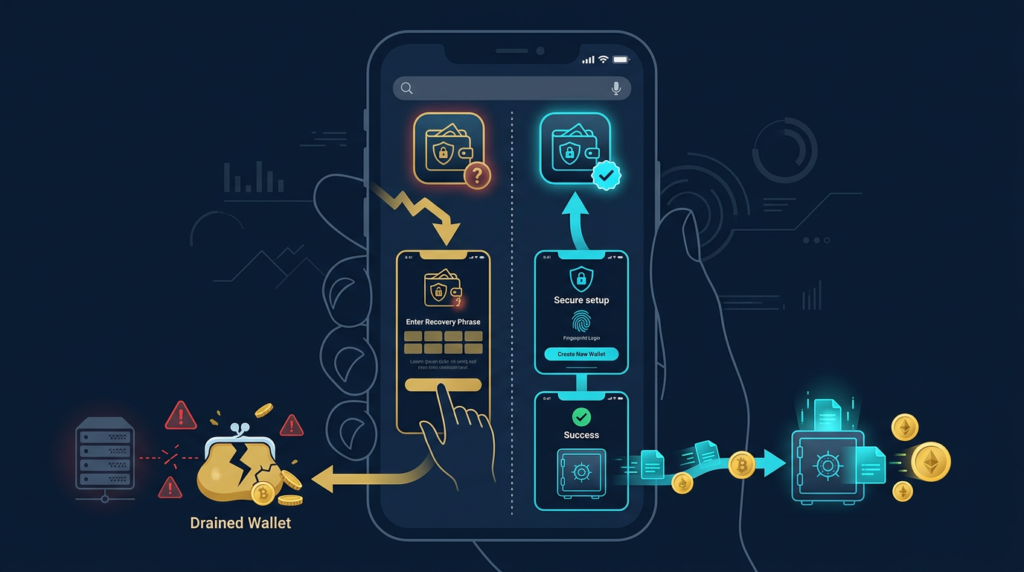
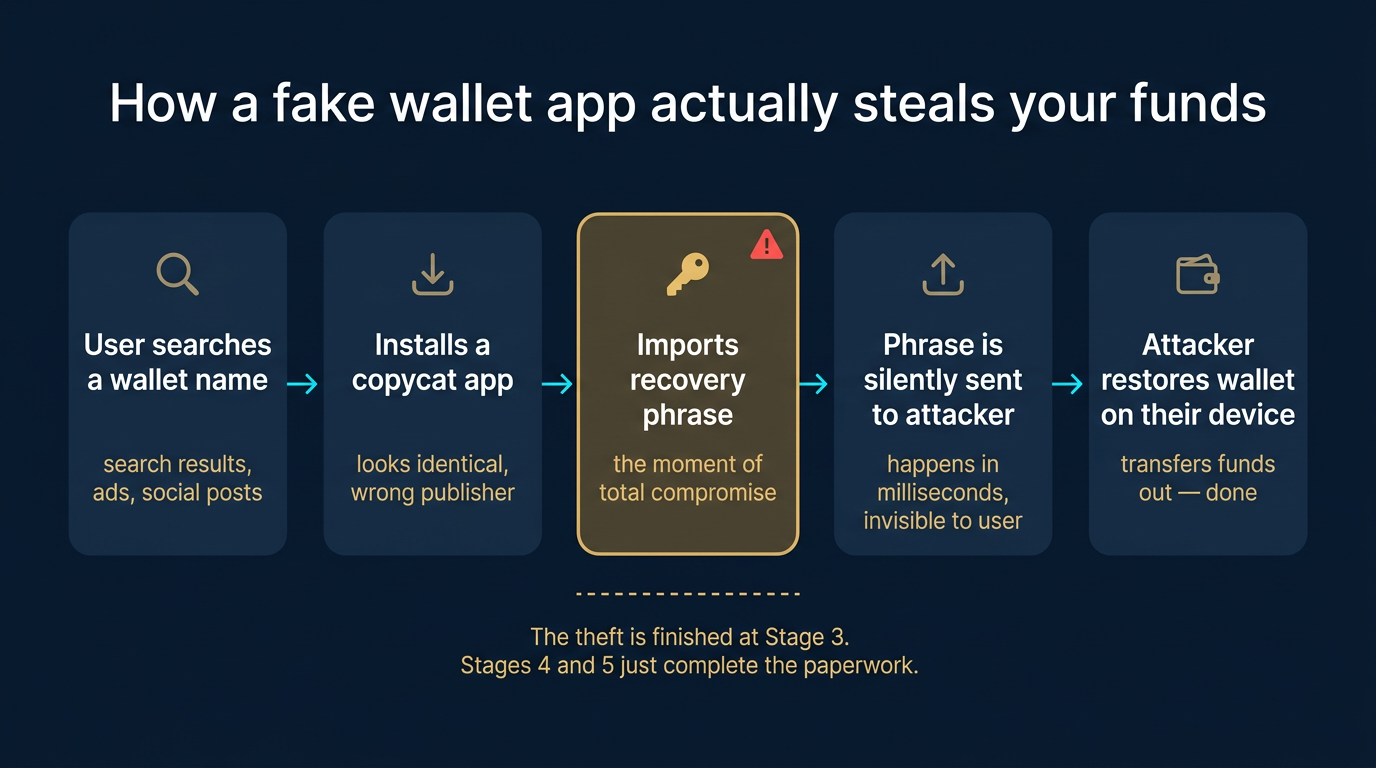
Most fake wallet app scams follow a simple pattern. The attacker creates a copycat mobile app, browser extension, or download page that mimics a trusted wallet brand. The victim installs it, believes it is real, and either creates a new wallet or imports an existing one. If the app captures the recovery phrase, private key, or password and sends it out to the attacker, the rest is straightforward. The attacker restores the wallet on their own device and transfers funds away.
For a closely related follow-up, see Clipboard Hijacking Malware: How Crypto Addresses Are Silently Swapped.
A useful mental model is to think of a wallet app like the lock on your front door. If the lock itself was supplied by a thief, the security discussion ends before you even talk about alarms or strong doors. In the same way, a malicious wallet app compromises the entire setup before later precautions can help. The app is the point of trust, so if the app is fake, everything built on top of it becomes unreliable.
Seed phrase capture is the cleanest theft path
The most common and damaging version is simple recovery phrase theft. A fake app tells the user to restore an existing wallet, captures the words, and sends them to the attacker immediately. From that moment, the attacker does not need continued access to the device. They already control the wallet’s real credentials. This is why any app that asks you to import a wallet should be treated as a trust decision, not a routine setup step.
This overlaps with the broader patterns covered in crypto wallet phishing attacks, but the fake-app version is more dangerous at the software layer. Instead of luring you to a bad page once, it tries to become the trusted tool you keep using.
Fake software can also stage later theft
Not every malicious wallet steals immediately. Some fake apps wait until the user accumulates funds, copies a withdrawal address, or signs a transaction. Others may present altered interfaces, show fake balances, or manipulate destination addresses over time. That delayed behavior makes the theft harder to connect back to the original install decision.
One operator insight is that early normal behavior is not proof of safety. A fake wallet can look harmless while the balance is small, then activate once the account becomes worth stealing. Users often interpret a quiet first week as proof the app is legitimate when all it really proves is that the attacker was patient.
Where Users Encounter Copycat Wallet Apps
These scams spread through the same places people usually discover legitimate tools: app stores, search results, social posts, and community recommendations. That is why simply “looking official” is a weak test. The attack depends on meeting the user inside a channel that already feels normal.
Search results, ads, and cloned download pages
A common path starts with a user searching for a wallet name and clicking the first result. The destination may be a sponsored ad, a cloned download page, or a typo-domain that closely resembles the real site. The page then routes the user to a fake installer or to the wrong app listing. This is one reason saved bookmarks and direct navigation matter more than search convenience.
This is also why a hardware-wallet-first mindset helps. If users already understand what a hardware wallet is and why trusted setup paths matter, they are less likely to treat any download page as interchangeable. The real security decision starts before installation.
App-store impersonation and copycat branding
Users often assume that if an app appears in a store, the main security work has already been done. That assumption is too generous. Copycat apps can use nearly identical names, logos, descriptions, and screenshots. A scammer may rely on small spelling changes, slight publisher-name differences, or fake reviews to win trust from someone installing quickly on a phone.
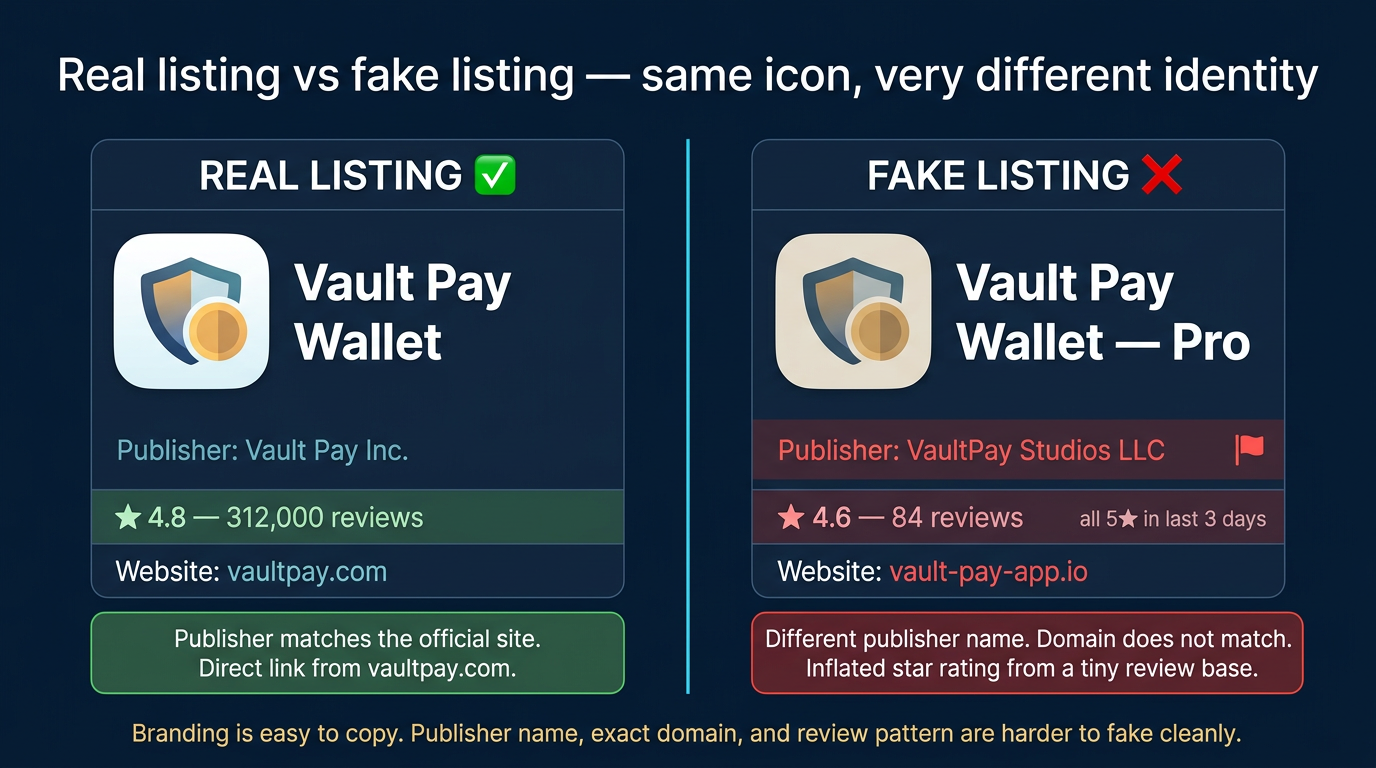
A second operator insight is that mobile installs are especially risky because users compare less information on small screens. They may glance at the icon and app name but ignore the publisher, permissions, external links, or the official download path. Attackers know that compressed mobile attention is an advantage.
Why Fake Wallet Apps Are Worse Than a One-Time Phishing Page
A phishing page tries to steal one action or one credential in a single session. A malicious wallet app aims to become part of your normal operating environment. That makes it more dangerous over time because it can shape many future decisions: restores, address copies, approvals, balance checks, and outgoing transactions.
The scam becomes your daily interface
If the victim uses the fake app regularly, the attacker may gain repeated opportunities rather than a single shot. Even when the original theft goal is the recovery phrase, the installed app can still continue harvesting data or creating false reassurance. The user may keep trusting the same bad interface because nothing obviously breaks right away.
That makes app-verification discipline a core security habit rather than a one-time technical detail. If the wallet software is wrong, the rest of the security stack starts on compromised ground. A strong password or cautious transaction review cannot fully compensate for malicious software that was trusted at installation.
Practical Usage: How to Verify a Wallet Download Before You Install
The goal is to make wallet installation boring and repeatable. Good verification is a short checklist, not a vague feeling. If you treat every install as a trust event, most fake apps lose their advantage immediately.
For a closely related follow-up, see Hardware Wallet Supply Chain Attack: What to Check.
- Start from the official project site: Do not search for the app name and click the first result. Open the official site from a trusted bookmark and use the app-store link provided there.
- Check the publisher, not just the logo: Compare the developer name, store listing, and linked website carefully. Branding is easy to copy; publisher identity is harder to fake cleanly.
- Never restore into an app you have not verified: Importing a seed phrase is the highest-trust action in the whole process. If the software source is uncertain, stop there.
- Use a small test flow first: Before committing meaningful funds, verify that the wallet behaves normally with a tiny amount and does not ask for suspicious recovery actions.
- Prefer stronger wallet compartmentalization: Keep larger holdings in a better-protected setup and use separate wallets for experiments, browsing, and routine mobile use.
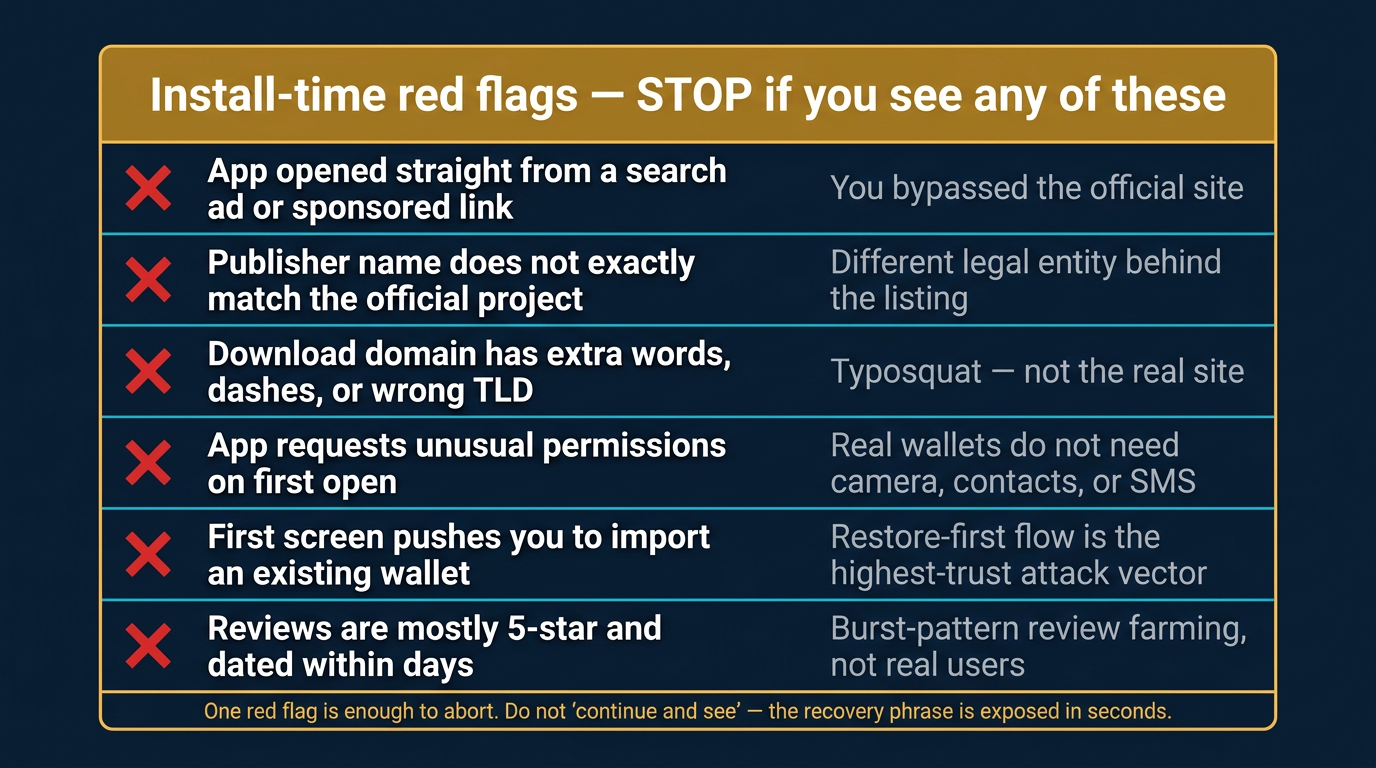
A practical beginner-safe workflow is to decide on the wallet product first, then visit the official site, then compare the exact store link and publisher, then install, then create or restore only after those details match. If anything about the listing feels slightly off, stop and use a different route. The right move is not to “try it and see.” The right move is to abort before the recovery phrase is ever exposed.
For the broader device and wallet-role discipline that supports this, the most relevant follow-ups are the crypto wallet security checklist and how to choose a crypto wallet. Those frameworks reduce the chance that one bad install can threaten everything you own.
Risks and Common Mistakes
- Assuming app stores guarantee safety: Store presence is helpful, but it is not a substitute for verifying the publisher and official download path.
- Restoring a valuable wallet too quickly: Importing a recovery phrase into unverified software is the fastest way to turn curiosity into a total-loss event.
- Comparing visuals instead of identity: Logos, screenshots, and app names are weak proof when scammers are copying a known wallet brand.
- Using one wallet for every role: The more value a single wallet holds, the more expensive one fake install becomes.
- Ignoring small irregularities: Odd permissions, spelling differences, awkward support links, or a slightly off developer name are often the whole signal you get before theft.
Sources
- MetaMask Support: How to Recognize the Real MetaMask
- MetaMask Support: Spoofs, Phishing, and Scams
- CertiK: Modal Phishing in Web3 Mobile Wallets
Frequently Asked Questions
What is a fake wallet app?
A fake wallet app is malicious software that impersonates a legitimate wallet in order to steal recovery phrases, credentials, approvals, or funds. It often looks nearly identical to the real app or download page.
How do fake wallet apps steal money?
They usually steal by capturing the recovery phrase during setup or restore, then recreating the wallet elsewhere and transferring funds out. Some also manipulate later actions such as address copying or approval flows.
Can a fake wallet app appear in an app store?
Yes. App stores reduce risk, but they do not eliminate copycat apps, typosquatted names, or misleading listings. That is why checking the official project site and exact publisher details matters.
What should I check before installing a crypto wallet?
Start from the official website, verify the store link and publisher, avoid search-result shortcuts, and never restore a valuable wallet into software you have not verified. A small test flow is safer than trusting the install blindly.
What should I do if I already entered my recovery phrase into a suspicious app?
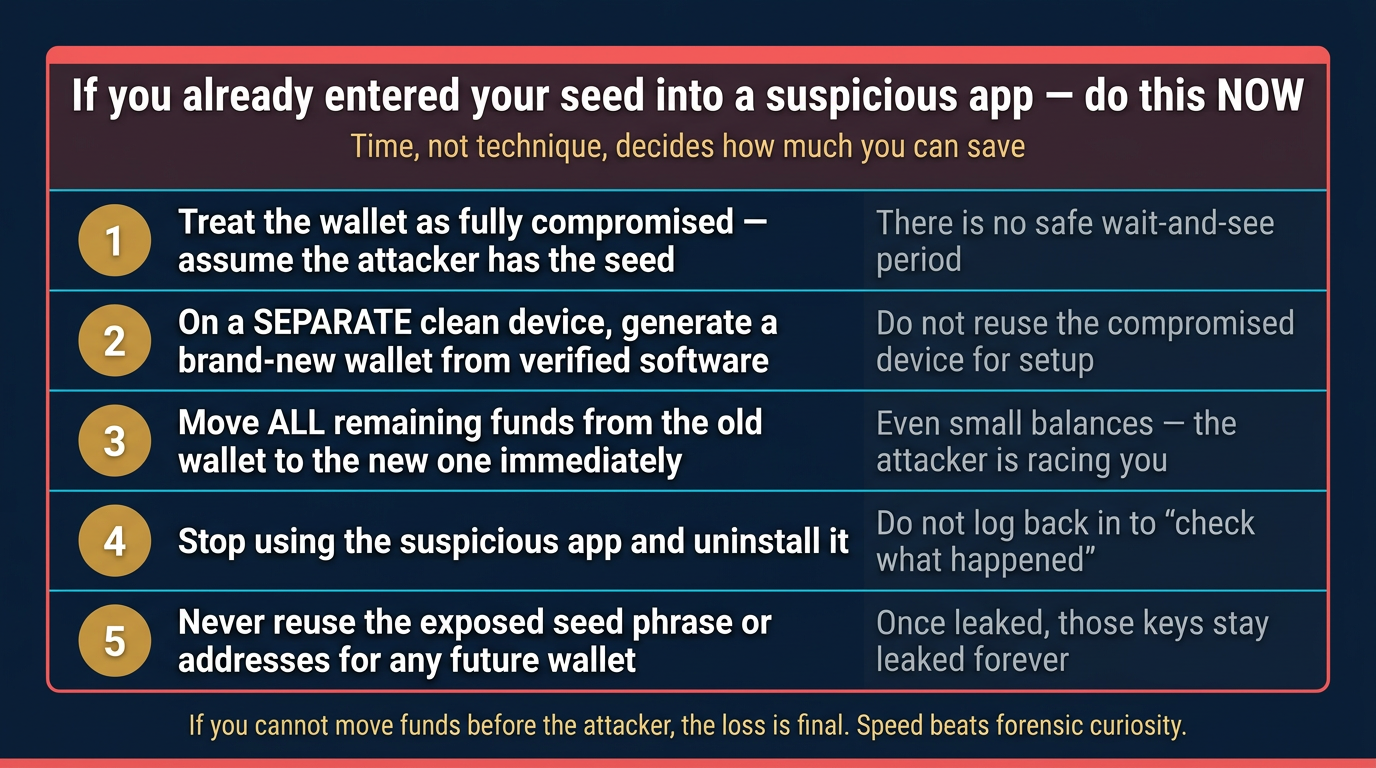
Assume the wallet is compromised. Move remaining funds to a fresh wallet created from verified software as quickly as possible, and do not continue using the old setup. With recovery phrases, there is no safe “wait and see” period.