Reading a blockchain transaction means turning a confusing explorer page into a clear answer about what actually happened on-chain. At minimum, you want to know whether the transaction was broadcast successfully, whether it confirmed, who sent value, who received it, what fee was paid, and whether any chain-specific details change the interpretation. That is the practical skill behind troubleshooting transfers, checking deposits, and investigating suspicious wallet activity.
The most important habit is to read the transaction in layers instead of staring at every field at once. Start with status. Then move to timing and confirmation. Then inspect who the transaction interacted with, what value moved, and what fee was paid. Only after that should you dive into inputs and outputs, gas usage, token events, or smart contract logs.
This content is for educational purposes only and should not be considered financial or investment advice.
Key Takeaways
For a closely related follow-up, see Bitcoin Mempool Congestion: Why Fees Spike and Transactions Stall.
For a closely related follow-up, see Wallet Address Reuse Risks: What It Exposes On-Chain.
- Start with transaction status first: Pending, confirmed, failed, or replaced gives you the basic outcome before any deeper interpretation.
- Use the transaction hash as the anchor: The hash is the unique identifier that lets you verify the same event across wallets and explorers.
- Fees and timing matter as much as value: A transfer can be valid but still delayed by congestion, low fees, or chain-specific processing rules.
- Bitcoin and Ethereum-style transactions expose different fields: Inputs and outputs dominate one model, while nonce, gas, and contract calls dominate the other.
- Explorer data is reliable, but interpretation still matters: The chain can show what happened, but it does not automatically explain why it happened.
Start With the Transaction Hash
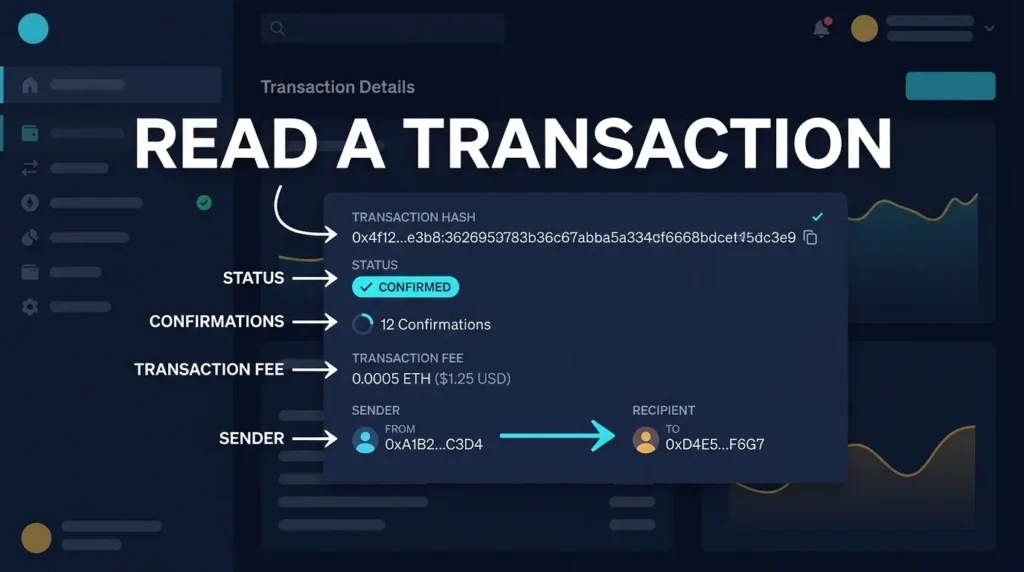
The transaction hash, often called the transaction ID or TXID, is the unique identifier for the on-chain event you are checking. It is usually a long hexadecimal string. If you have the hash, you can look up the same transaction directly in an explorer and avoid relying on screenshots, wallet labels, or incomplete support messages.
If you are new to explorer tools, the closest local primer is What Is a Blockchain Explorer. That article explains where these transaction pages come from and what an explorer is actually showing you.
Step 1: Check the Status
The first question is simple: did the network accept the transaction yet? Most explorers show one of a few top-level states such as pending, confirmed, successful, failed, dropped, or replaced. This tells you whether the transaction is already included in a block or still waiting in the network.
- Pending: The transaction has been broadcast but is not yet finalized in a block.
- Confirmed or successful: The network included it in a block and recognized it as valid.
- Failed: Common on smart-contract chains when execution reverted.
- Replaced: Common on Bitcoin when a transaction is fee-bumped or otherwise superseded.
One practical insight is that “pending” does not mean “lost.” It usually means the transaction is still competing for inclusion, especially on congested networks. For Bitcoin-specific waiting behavior, see Bitcoin Mempool Explained: How the Transaction Queue Works.
Step 2: Check Block Inclusion and Confirmations
Once a transaction is included in a block, the explorer will usually show the block number or block height, plus the number of confirmations. A confirmation means another block has been added after the one containing your transaction. More confirmations generally mean greater confidence that the transaction is final enough for the use case involved.
A useful mental model is to think of confirmations as depth under additional chain history. The deeper a transaction sits, the harder it is to reverse. That is why exchanges, merchants, and large counterparties often wait for more than one confirmation before crediting funds as final.
Step 3: Check Sender, Recipient, and Value
After status and confirmations, the next layer is who the transaction interacted with and how much value moved. On account-based chains, this often looks straightforward: a sender address, a recipient address, and a value field. On UTXO-based chains such as Bitcoin, the picture is less direct because one transaction may consume multiple inputs and create multiple outputs, including a change output that sends funds back to the sender.
That is why beginners sometimes think they sent funds to the wrong place when they really just created a change output. For the structure behind that, the best local definition is What Is UTXO?.
Step 4: Check the Fee
The fee explains part of the transaction’s behavior. If the fee was too low for current network conditions, the transaction may remain pending longer than expected. On Bitcoin, explorers often show a fee rate such as sat/vB. On Ethereum-style chains, explorers show gas price, gas used, and total fee paid.
A second mental model helps here: the fee is the priority bid attached to the transaction, not just an administrative charge. That is why a valid transfer can still wait if it underbids current demand. For the pricing logic behind that, see Bitcoin Transaction Fees Explained.
Step 5: Read the Chain-Specific Fields
This is the point where the chain matters. A Bitcoin transaction page emphasizes inputs, outputs, fee rate, weight or vbytes, and confirmation count. An Ethereum-style transaction page emphasizes nonce, gas limit, gas used, gas price, contract interaction, and token transfer events. The same “transaction” concept exists on both chains, but the data model is different.
- Bitcoin-style fields: inputs, outputs, change output, sat/vB, vbytes, confirmations.
- Ethereum-style fields: nonce, gas used, gas price, method call, token transfers, logs.
If you want the structural reason those pages look different, the best local follow-up is Bitcoin vs Ethereum Transaction Model.
Step 6: Check Whether the Transaction Was Signed and Broadcast Normally
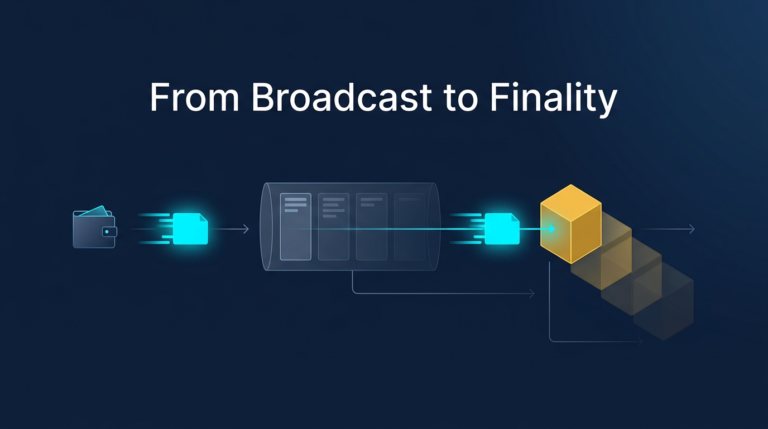
By the time a transaction appears in an explorer, it has already been signed and broadcast to the network. But if something looks wrong, it helps to remember the order of events: the wallet builds transaction data, signs it, broadcasts it, and then the network decides whether and when to include it. Explorer pages show the result of that process, not the private signing step itself.
That distinction matters when users confuse “I approved it in my wallet” with “the network finalized it.” Those are not the same step. For the wallet-side authorization process, see What Is Transaction Signing in Crypto.
Step 7: Interpret the Outcome in Context
After reading the fields, ask what they mean for the real-world question you are trying to answer. If you are verifying a deposit, the key issue may be confirmation count. If you are debugging a stuck payment, the key issue may be low fees or congestion. If you are reviewing suspicious wallet activity, the key issue may be where funds moved next and whether the transaction interacted with a suspicious contract.
One operator insight is that users often over-focus on the transaction’s raw success status and under-focus on the meaning of the interaction. A transaction can succeed technically while still representing a bad approval, a malicious contract call, or an unintended token transfer. Success on-chain does not automatically mean success for the user.
Practical Usage: A Simple Reading Order
If you are looking at a confusing explorer page, use this order every time:
- Find the transaction hash and make sure you are on the correct explorer page.
- Check the status to see whether the event is pending, confirmed, failed, or replaced.
- Check the block and confirmations to understand timing and finality.
- Check sender, recipient, and value to confirm the intended movement of funds.
- Check the fee details to explain delays or execution cost.
- Check chain-specific fields such as inputs and outputs or gas and method data.
- Check the wider context by following linked addresses, related token events, or later transactions when needed.
This order keeps you from getting lost in low-level details too early. It also mirrors how good support teams troubleshoot when a user says, “My crypto transaction is stuck,” or “I do not know where my funds went.”
Risks and Common Mistakes
- Confusing pending with failed: Many transactions are simply waiting on fee market conditions or confirmation timing.
- Misreading change outputs as extra recipients: This is especially common when reading Bitcoin transactions for the first time.
- Ignoring fee data: The fee often explains why a transaction is moving slowly or why the total cost feels higher than expected.
- Assuming technical success means a safe action: Malicious approvals and bad trades can still settle successfully on-chain.
- Reading one field in isolation: Status, value, confirmations, and counterparty context need to be interpreted together.
Sources
- Bitcoin Developer Reference: Transactions
- Bitcoin Developer Guide: Transactions
- Ethereum.org: Transactions
Frequently Asked Questions
What should I check first in a blockchain transaction?
Check the status first. That tells you whether the transaction is pending, confirmed, failed, or replaced before you spend time interpreting the rest of the page.
Why does a Bitcoin transaction show multiple outputs?
Because Bitcoin uses the UTXO model. A transaction can send funds to the recipient and also create a separate change output that returns the remainder back to the sender.
Why is my transaction still pending?
It may be waiting because of low fees, network congestion, or the normal confirmation process of that chain. Pending does not automatically mean the transaction failed.
What does gas mean on an explorer?
On Ethereum-style chains, gas measures the computational resources needed to execute a transaction or smart contract call. The explorer usually shows gas used, gas price, and the total fee paid.
Can a transaction succeed on-chain and still be a bad outcome?
Yes. A malicious approval, bad trade, or interaction with the wrong contract can succeed technically while still being harmful from the user’s point of view.